BetterReads Blog
Inline Glossary Highlights: Color-Coded Help in the Text
By BetterReads ·
Call me Ishmael is easy. The next page is not.
By the end of Chapter 1 in Moby-Dick, you have already met hypos, spleen in an old sense, Manhattoes, and a tide of rigging vocabulary that assumes you have walked a forecastle. The book is generous with language; it is not generous with pauses.
BetterReads already ships a companion glossary for many classics—the same material you can browse in Study or look up when you annotate a passage as Glossary (Smarter Annotations). That helps when you know you are stuck.
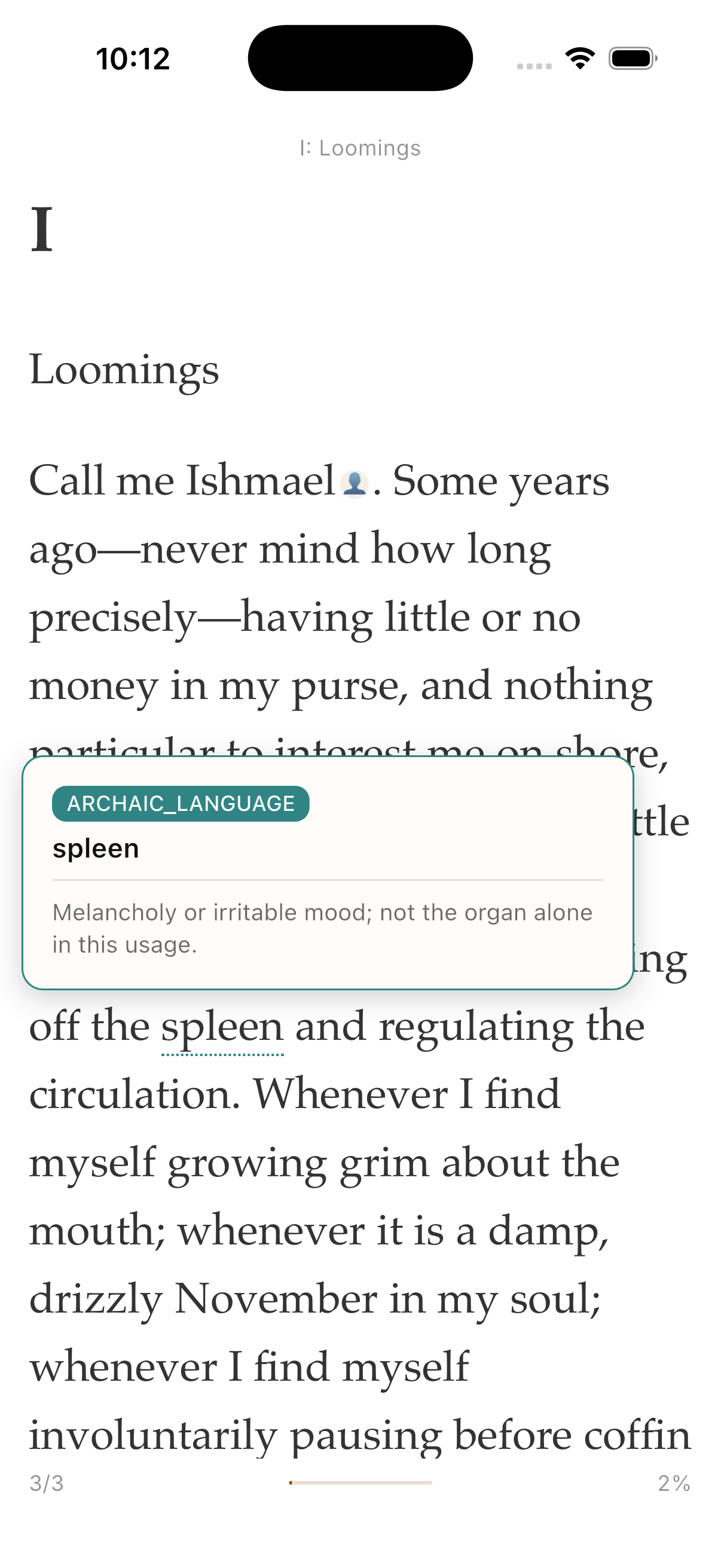
This update helps when you do not yet know you are stuck: dotted underlines in the text itself, each color naming the kind of unfamiliar word, with a short definition on tap or hover.
It is live today on web and in the BetterReads app for Moby-Dick (Standard Ebooks edition). More nautical and archaic-heavy titles will follow the same pipeline.
Stay in the sentence
The old rhythm for a hard classic looked like this: read → stumble → leave the page → search → forget where you were.
Inline glossary highlights keep the loop inside the chapter:
- Turn on Glossary inlay in the reader (same control as before—now much denser on supported books).
- Unfamiliar words pick up a dotted underline as you scroll.
- Tap (mobile) or hover (web) the underline for a compact tooltip: headword, short definition, and a color badge that tells you what sort of term it is.
- If you want the fuller book entry—or to add the word to Study—open the companion glossary from the reader as usual.
You are not asked to pre-select every word. The chapter companion carries a micro-glossary: the terms most likely to slow you down in this chapter, matched to the text on the page.
For Moby-Dick, that means more than 500 book-level glossary entries and roughly 2,300 inline chapter hints across 139 chapters—not a separate dictionary site, but help anchored to the line you are reading.
Colors mean something
Some reading editions rotate highlight colors for visual variety. BetterReads uses semantic colors: the underline tells you what kind of help you are getting before you open the tooltip.
| Color | What it marks | Examples in Moby-Dick |
|---|---|---|
| Teal | Archaic or literary English | hypos, belike, spleen (melancholy) |
| Gold | Nautical / shipboard terms | abaft, halyard, forecastle |
| Coral | Whaling and the fishery | spermaceti, cutting in, gam |
| Green | Places, peoples, customs | Nantucket, Manhattoes, material culture |
| Violet | Historical reference, myth, scripture | Jonah, Leviathan, period institutions |
We kept the palette readable in both light and dark reader themes. Color is supplementary—you always get the word and definition in the tooltip, not color alone.
Book glossary + chapter micro-glossary
Two layers work together:
Book glossary — curated definitions for the whole novel: literary context, historical notes, and a dedicated nautical/archaic lexicon merged with BetterReads’ existing glossary pipeline. Terms know their category and first chapter so Study and the glossary browser stay organized.
Chapter micro-glossary — a shorter list scoped to the chapter you are in. It drives the inline underlines and marks every occurrence of each matched word in the section, not only the first time it appears.
That split matters on a book like Moby-Dick. Ishmael’s voice mixes plain confession, biblical echo, and deck jargon in a single paragraph. A single “key terms” list at the top of a chapter cannot cover the density of the prose. Micro-glossary meets you on each page.
Where it shows up
- Web reader at betterreads.online — hover underlines for tooltips; glossary inlay toggle in the reader chrome.
- iOS and Android — same companion data, tap for the tooltip; synced when you sign in.
If you already use semantic annotations (When to Use Each Category), think of inline glossary as the inverse path: the book marks its hard words first; you can still add your Glossary notes on top when something personal needs capturing.
Try it on Chapter 1
Open Moby-Dick, enable glossary inlay, and read Loomings.
Watch for teal on mood and old diction in the opening paragraphs, gold when the narrative turns toward ships and the sea, green when Manhattan and Nantucket enter the picture. Tap or hover one underline, read the short gloss, keep going without losing the sentence.
If a term matters enough to remember later, send it to Study from the companion glossary—the colored categories carry through so review sessions stay legible.
We built this for readers who want the difficulty of a great book without the friction of constantly leaving it. More lexicon-backed titles are queued; Moby-Dick is the first full pass.
Related reading
- Smarter Annotations: Glossary Lookup, Visual Explain, and Instant Recall — your own glossary notes and dictionary lookup while reading.
- Your Highlights Deserve a Second Life: Introducing BetterReads Study — turn saved terms into spaced recall.
- Semantic Annotation: When to Use Each Category — Character, Theme, Glossary, and the rest when you mark the text.
Get BetterReads on your phone
Your bookshelf, highlights, and reading tools are in the iOS and Android apps—the same experience as the web reader, synced when you sign in.
Or continue in the browser at betterreads.online.