BetterReads Blog
Stage Lens: Reading Plays Beat by Beat
By Zhao Lu ·
See also: Epic Chapter Lens — the companion shape BetterReads uses for verse epics like the Odyssey.
A play is not a chapter
Open Macbeth or Hamlet and the table of contents already tells you something novels rarely do: the text is organized by act and scene, not by numbered chapters with a single narrative arc.
That structure matters when you read. A scene can turn on one entrance, one line of subtext, or a shift from public speech to private aside. A chapter summary written for prose fiction often flattens those turns—it tells you what happened without showing you where the stage changed.
BetterReads uses a Stage Lens for dramatic works that need it: a reading companion shaped around dramatic beats rather than a single block of summary at the end of a scene.
Today, the full Stage Lens experience is available on one play in the catalog: Agamemnon. Other dramas—including Shakespeare—use scene-scoped Chapter Lens companions for now. We are actively improving the content and reading flow so hard texts are easier to digest without leaving the page, and we plan to extend Stage Lens to more plays over time.
What Stage Lens does
Where the Chapter Lens orients you after a chapter of prose, Stage Lens stays closer to the rhythm of performance:
- Dramatic beats — prologue, parodos, episode, stasimon, and other units the play actually moves through
- On this page — a short callout for where you are inside the current beat
- Lines you're reading — plain-language help for difficult lines near your scroll position, updating as you move through the text
- Stage picture — who is on stage, where the action sits, what the audience would see
- Track the argument — who claims what, when the rhetoric shifts
- What is happening / difficult / worth noticing — the same reflective prompts as other lenses, scoped to the current beat, not the whole act
The goal is not a definitive interpretation. It is orientation inside dramatic time—so you can keep reading without losing the thread of the scene.
Example: the opening of Agamemnon
Aeschylus's Agamemnon is a good place to see why this matters.
The play does not begin with dialogue between named characters in a drawing room. It begins on the roof of the palace at Argos, with a Watchman alone in the dark, waiting for a beacon that will mean Troy has fallen. Victory and dread arrive in the same breath—and the house he serves is already wrong.
In BetterReads, open Agamemnon and the reading companion switches to Stage Lens. The first beat is Prologue:
Night on the palace roof. The Watchman, alone, waits for a beacon that means Troy has fallen. Mid-speech the fire appears; he shouts to the house, then goes inside.
That framing is different from a novel's chapter summary because it names stage space and dramatic unit first.
As you scroll, line helps attach to the hard phrases in Murray's verse—for example, archaic diction or compressed syntax that looks plain until you know what the Watchman is actually watching for. Tap a beat chip (Prologue, Parodos, First Episode, and so on) to jump the structure when you want to re-read a section as a unit.
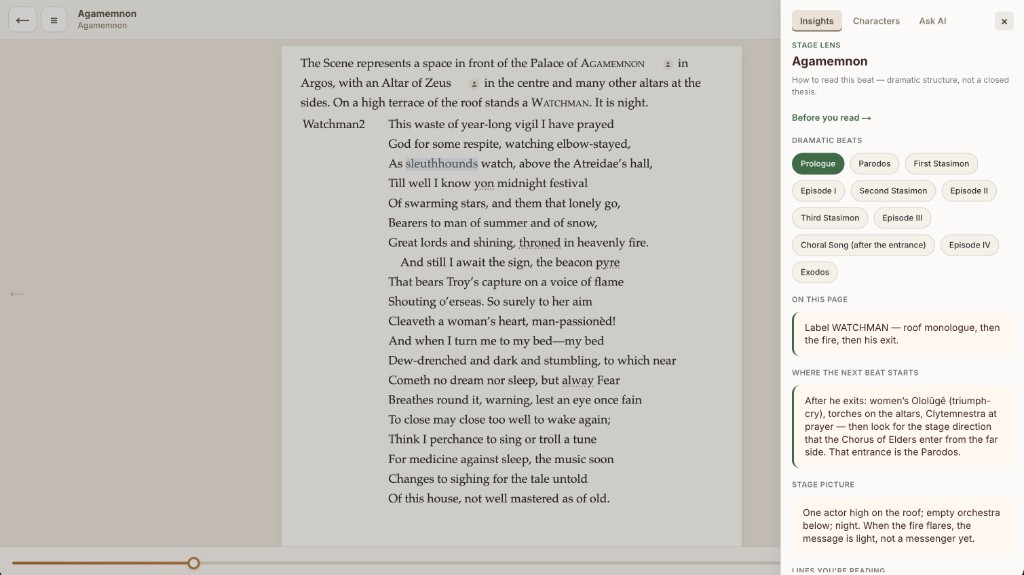
Beat chips and scroll, together
Two things work at once:
- Scroll — the lens picks the beat that matches your position in the text and surfaces line helps for what is near the top of the page.
- Beat chips — when you want to study one unit as a whole, select it explicitly; the panel stays on that beat while you re-read.
That combination matters in Greek tragedy especially, where time jumps—from the ten years at Troy to the night of the beacon, from the elders' parodos to the king's return—and where the Chorus can speak for the city in one moment and the audience's shared myth in the next.
Stage Lens also includes Background when a beat assumes knowledge the original audience carried (Iphigenia at Aulis, the curse on the house of Atreus, what a parodos is). Expand it when you need context; ignore it when you do not.
How Stage Lens relates to Chapter Lens
BetterReads does not force one template on every book.
| Shape of text | Companion |
|---|---|
| Novels and most prose | Chapter Lens — summary, themes, characters for the chapter |
| Plays and staged drama | Stage Lens — beats, stage picture, argument, scroll-synced lines |
| Verse epics (Homer) | Epic Chapter Lens — see the companion post |
Shakespeare titles in the catalog already use scene-level structure in the table of contents—Act I, Scene ii, and so on—and carry scene-scoped Chapter Lens companions. Stage Lens is the richer beat-level form; Agamemnon is where it lives today while we refine the model and prepare to roll it out to more plays.
Where we are—and where this is going
Stage Lens is still early. We are working on:
- Clearer, more digestible content — shorter line helps, better beat boundaries, less to absorb at once
- Smoother reading flow — scroll sync, beat chips, and stage picture that stay out of your way until you need them
- More plays — Greek tragedy first, then Shakespeare and other staged drama as the format proves itself
If you read Agamemnon with Stage Lens and something confuses more than it clarifies, that feedback matters. The goal is the same as everywhere in BetterReads: help beside the text, not a lecture on top of it.
When to open it
Stage Lens is optional, like every companion in BetterReads. It earns its place when:
- you lose track of who is speaking to whom on stage
- a line reads as archaic or allusive and you want plain sense without leaving the page
- you finish a stasimon and need to remember what argument the play was building
- you want to read a tragedy as something meant to be seen, not only parsed as text
Open the Reading Lens and read the beat you are in—not the one you wish you were already past.
Try it: Agamemnon in BetterReads — open the play, turn on the reading companion, and start from the Watchman on the roof.
Get BetterReads on your phone
Your bookshelf, highlights, and reading tools are in the iOS and Android apps—the same experience as the web reader, synced when you sign in.
Or continue in the browser at betterreads.online.