BetterReads Blog
Why Semantic Annotation Needs a Domain
By BetterReads ·
A highlight is never only a piece of text. It is also a decision about what the text is doing.
In a novel, you might mark a character's gesture, a scene, or a recurring theme. In a technical book, the useful label may be API, trade-off, or failure mode. In a research paper, you may want claim, method, evidence, or open question.
The passage has not changed. The reading task has.
That is the reason for adding a domain to semantic annotation in BetterReads.
Domain is context, not a second tag
The annotation category answers, “What am I saving here?” The domain adds, “What kind of reading makes that answer useful?”
This distinction matters because a universal list of categories quickly becomes either too vague or too long. “Idea” can be a good general label, but someone reading a systems paper may need to distinguish a claim from its evidence. Someone reading a programming guide may be collecting concepts, interfaces, and decisions rather than literary themes.
BetterReads currently provides domain presets for:
- General — a flexible starting point for mixed reading
- Literature — characters, scenes, themes, ideas, and quotes
- Technology — concepts and technical decisions worth returning to
- Research — claims, methods, evidence, and questions to investigate
The domain does not tell you what a passage means. It gives your annotation practice a more useful set of handles.
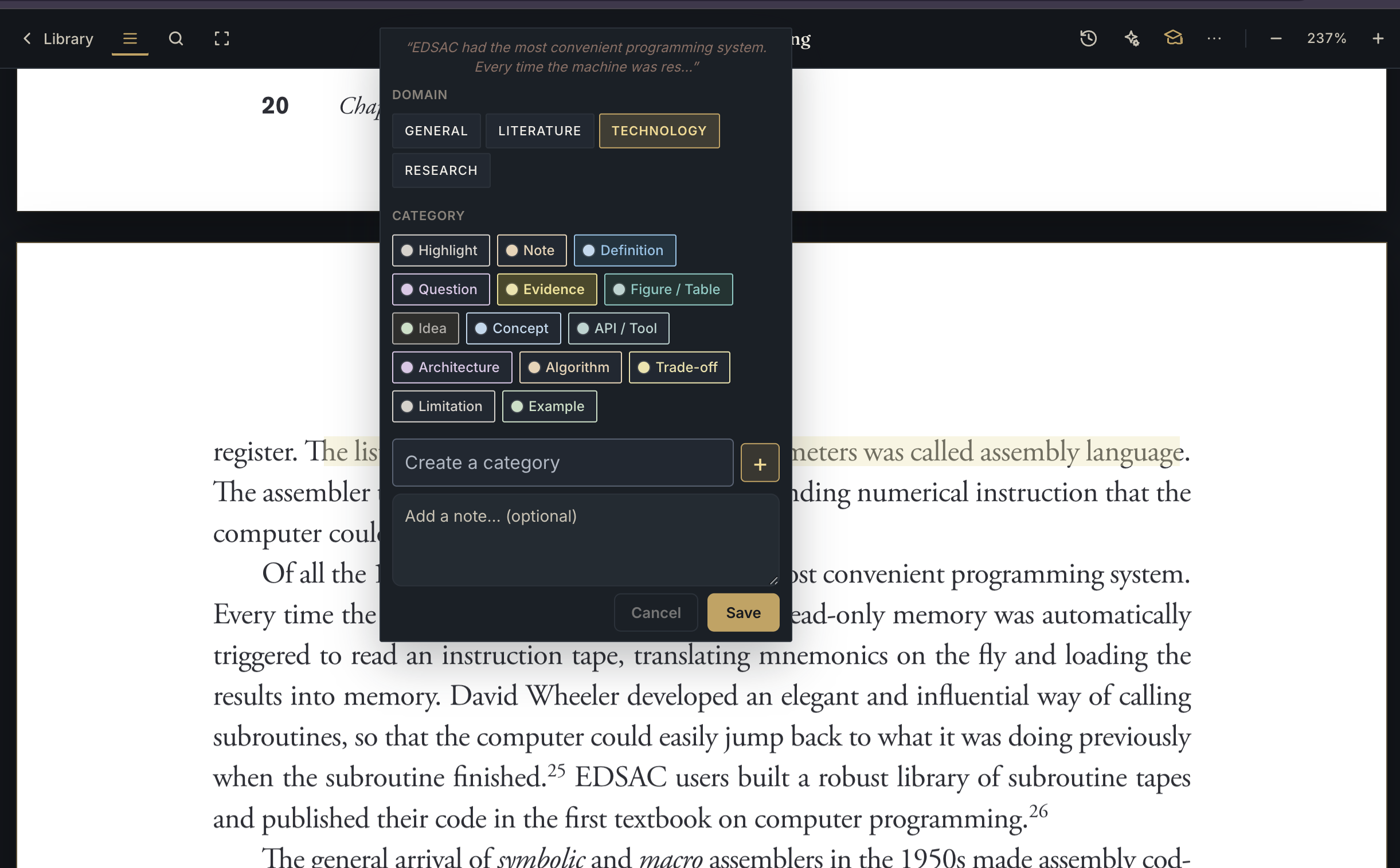
Here, the selected domain is Technology. The available labels shift toward the work of technical reading: Definition, Evidence, Figure / Table, Concept, API / Tool, Architecture, Algorithm, Trade-off, Limitation, and Example. The Create a category field is the important part at the bottom: when the provided vocabulary does not quite fit, you can add your own.
Custom categories are part of the model
Presets should make a new book easier to enter, not force every book into the same vocabulary. That is why semantic annotation also supports custom categories.
You might create categories such as:
- Definition and counterexample while learning a technical subject
- Motif and turning point for a particular novel
- Primary source, assumption, and follow-up for a research project
- Question for discussion when reading with a group
A custom category is not merely a renamed preset. It is a piece of vocabulary that reflects the way you are reading this book, course, or project. The category label travels with the highlight, along with its identifier and domain, so the annotation remains interpretable when you return to it later.
This is also where personal systems become possible without making the default experience complicated. Start with a preset. Add a category when the text keeps asking for one. Let the vocabulary emerge from the reading.
What about detecting the domain automatically?
The next obvious question is whether BetterReads could look at a book and suggest its domain. A title, publisher, subject, or opening chapter might provide useful signals. A book could even move between domains: a history of computing can be literature for one reader, research for another, and technical background for a third.
Self-detection is therefore an interesting feature to explore, but it is not something we are presenting as solved. The automatic domain-detection path has not been tested yet. It needs evaluation against mixed books, ambiguous subjects, translations, and readers whose purpose differs from the book's catalog description.
For now, choosing the domain yourself is deliberate. It keeps the context visible and puts the reader's intention ahead of an inference that may sound confident while being wrong. A future version might suggest a domain, ask for confirmation, or learn from the categories you actually use. Those are experiments, not promises.
A small field test
Try this on your next book:
- Choose the domain that matches your purpose, not just the shelf where the book belongs.
- Mark a few passages using the preset categories.
- Notice what you keep wanting to call something that the preset does not name.
- Add one custom category instead of broadening every existing label.
- Revisit the annotations later and ask whether the domain helped you find a pattern.
The goal is not to classify every sentence perfectly. It is to make your highlights easier to review, compare, and use. A domain gives categories somewhere to belong. A custom category gives your own way of thinking a place in the system.
See also: Semantic Annotation: When to Use Each Category — a practical guide to the literature categories, and Structured Annotation for Deep Reading — why giving a highlight a job can improve recall.
Get BetterReads on your phone
Your bookshelf, highlights, and reading tools are in the iOS and Android apps—the same experience as the web reader, synced when you sign in.
Or continue in the browser at betterreads.online.