BetterReads Blog
Stay With the Text: Explain, Ask Follow-Ups, and Save What You Learn
By BetterReads ·
The hardest part of a difficult book is often one paragraph
You are following the chapter. Then a sentence stops you.
The words are familiar, but the point is not. A pronoun refers to someone you no longer remember. A historical detail carries more weight than the text explains. A character reaches a conclusion, and you can see what they think without understanding why.
The usual solution is to leave the book. You copy a phrase, open a search engine or chatbot, explain which book and chapter you are reading, and try to reconstruct the context you just left.
Even when that works, the reading spell is broken.
BetterReads takes a different approach: bring the explanation to the passage, then get out of the reader’s way.
Select the text that is resisting you
With Explain, you begin by selecting the exact words you want help with.
That selection matters. A question such as “What does this mean?” is vague in an ordinary chat window. Inside BetterReads, it already has a subject:
- the selected sentence or paragraph
- the book and author
- the chapter you are currently reading
- the surrounding passage and reading position
Tap Explain and a concise answer opens over the book. The page remains visible behind it, so the explanation feels connected to the sentence rather than detached from it.
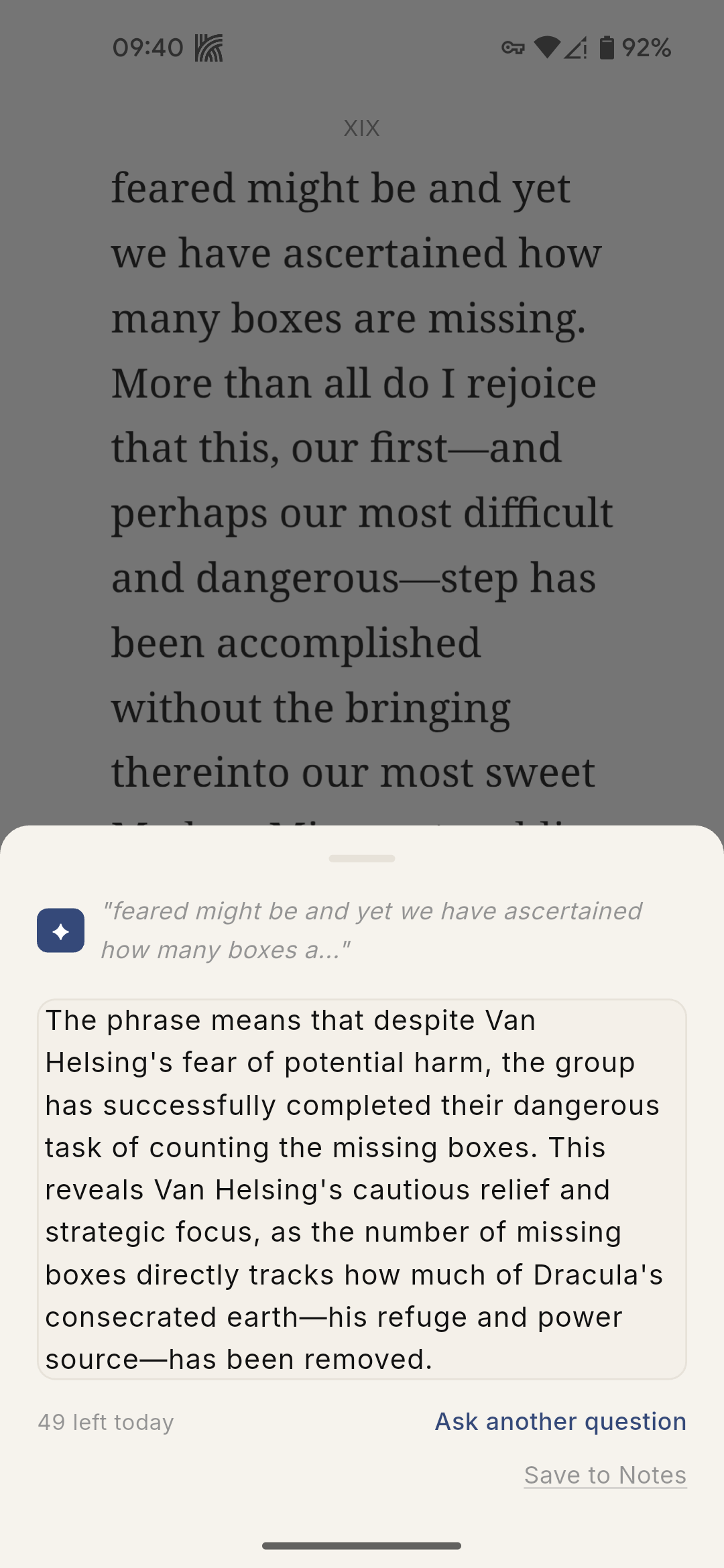
The goal is not to replace the passage with a summary. It is to remove the specific obstacle that stopped you.
Ask the question you actually have
Sometimes a plain-language explanation is enough. Sometimes it reveals the question you actually wanted to ask.
Suppose a passage in Dracula explains that several missing boxes have been counted. BetterReads can clarify the literal action, but you may still wonder:
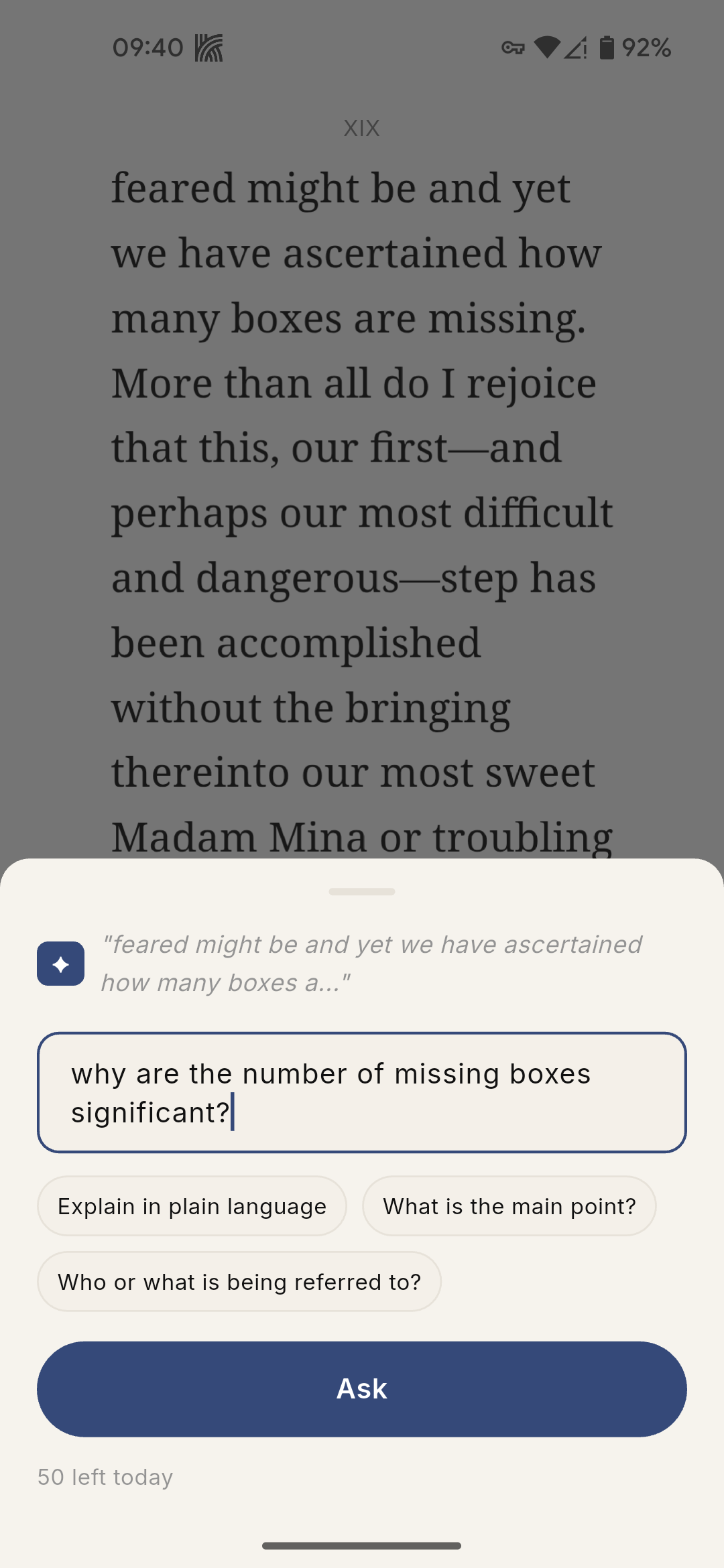
Why is the number of missing boxes significant?
Tap Ask another question and type whatever you want to understand. You are not limited to a fixed menu or required to phrase the question in a particular way. Ask about a character’s motive, the significance of a detail, an unfamiliar reference, the logic of an argument, or anything else that is keeping you from moving forward.
BetterReads also offers optional suggested questions such as:
- Explain in plain language
- What is the main point?
- Who or what is being referred to?
These suggestions are conveniences, not constraints. Tap one when it expresses what you need, edit the wording, or ignore them and write your own question from scratch.
Keep asking without rebuilding the context
One answer can naturally lead to another question. After learning what a sentence means, you might ask why the detail matters, how it connects to an earlier event, or what a character is implying.
BetterReads keeps that follow-up connected to the selected passage and the conversation so far. You do not need to paste the quotation again, reintroduce the novel, or repeat the previous answer. You can keep narrowing the uncertainty until the passage clicks.
This turns AI assistance into a small reading conversation. It can move from what the sentence says, to why it matters, to how it connects to the chapter—without becoming a separate research session.
Context changes the quality of an explanation
The same words can mean different things in different books, chapters, or scenes.
“The boxes are missing” is merely a logistical fact without context. In Dracula, the count tracks how many of the Count’s refuges remain available to him. The detail carries strategic and symbolic weight that a dictionary cannot supply.
BetterReads uses reading context to answer the question the passage is actually asking. This is especially useful for:
- archaic or indirect language
- political, religious, and historical references
- long sentences whose logic is hard to follow
- unclear pronouns or character references
- symbols and recurring motifs
- consequences implied earlier in the book
The answer is kept close to the reader’s current position and avoids using later events merely to sound comprehensive.
Save the answer as part of your reading
Some explanations solve a momentary confusion. Others change how you understand the rest of the book.
When an answer is worth keeping, tap Save to Notes. BetterReads preserves it as an annotated note connected to the source passage and your place in the book.
That connection is important. A quotation alone can become mysterious weeks later. An annotated explanation keeps the three useful parts together:
- the original text
- the question you were trying to answer
- the explanation that made the passage click
Saved answers become part of your reading timeline alongside highlights and your own notes. You can return to them when a theme reappears, when you resume the book after a break, or when you want to reconstruct how your understanding developed.
The result is not a folder of AI output. It is a record of the places where you stopped, asked, understood, and continued.
Why this is different from opening a chatbot
A general chatbot can explain literature, but the reader has to manage the context: copy the passage, name the edition, identify the chapter, avoid spoilers, and move the useful answer back into a notes system.
BetterReads already knows where the question came from.
The workflow stays continuous:
Select → Explain → Ask a follow-up → Save to Notes → Keep reading
There is no tab to recover, no prompt to reconstruct, and no answer stranded away from the book.
That continuity is the feature. AI is most helpful here not because it can say more, but because it can resolve confusion at the moment it appears and then let the text take over again.
A reading companion should return you to the book
Explain is not meant to do the reading for you. It does not decide what a passage means once and for all, and it should not flatten ambiguity that the author placed there deliberately.
It acts more like a knowledgeable companion sitting beside you:
- quiet until you ask
- aware of where you are
- ready for one more question
- able to remember what was useful
The measure of success is simple: after the explanation, you understand enough to continue.
That is what BetterReads is built for—not replacing difficult books, but helping more readers stay with them.
Get BetterReads on your phone
Your bookshelf, highlights, and reading tools are in the iOS and Android apps—the same experience as the web reader, synced when you sign in.
Or continue in the browser at betterreads.online.